
AI virtual staging that verifies the room it staged
Last updated: 2026-07-21
AI virtual staging uses an image model to add furniture and décor to a photo of a real room — or to bring out the best in a building exterior — usually in 1-5 minutes instead of days. The technology is no longer the hard part. The hard part is trust: whether the room in the result is still your room. That is the part we built Stagefront around.
How AI staging actually works here
- Upload. Any photo from your phone or camera — no prep needed. If it is on the small side, we sharpen and upscale it before editing so older photos still come out clean.
- Recognize. The system classifies what it sees — living room or laundry, façade or courtyard — and suggests the right mode. Photos are never switched without asking.
- Generate. Your chosen style is applied. For empty rooms this runs through a floor mask, so the AI can only work where furniture goes — walls, windows and built-ins are your original pixels, not a re-imagination of them.
- Verify & label. The result is checked against your original — windows, doors, panes, wall color. A failed check regenerates free. The label is baked into the file, and the original is kept next to the result.
Interior · Bedroom — real Stagefront output
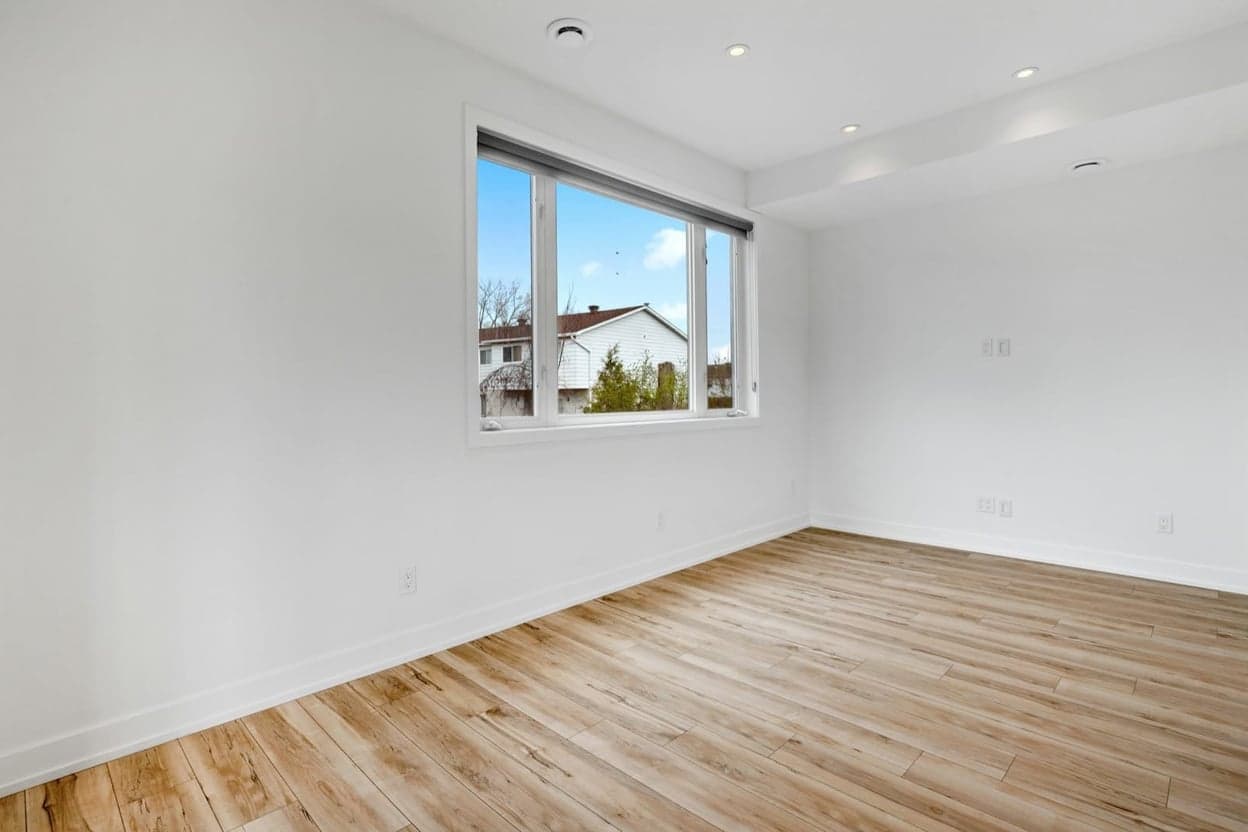
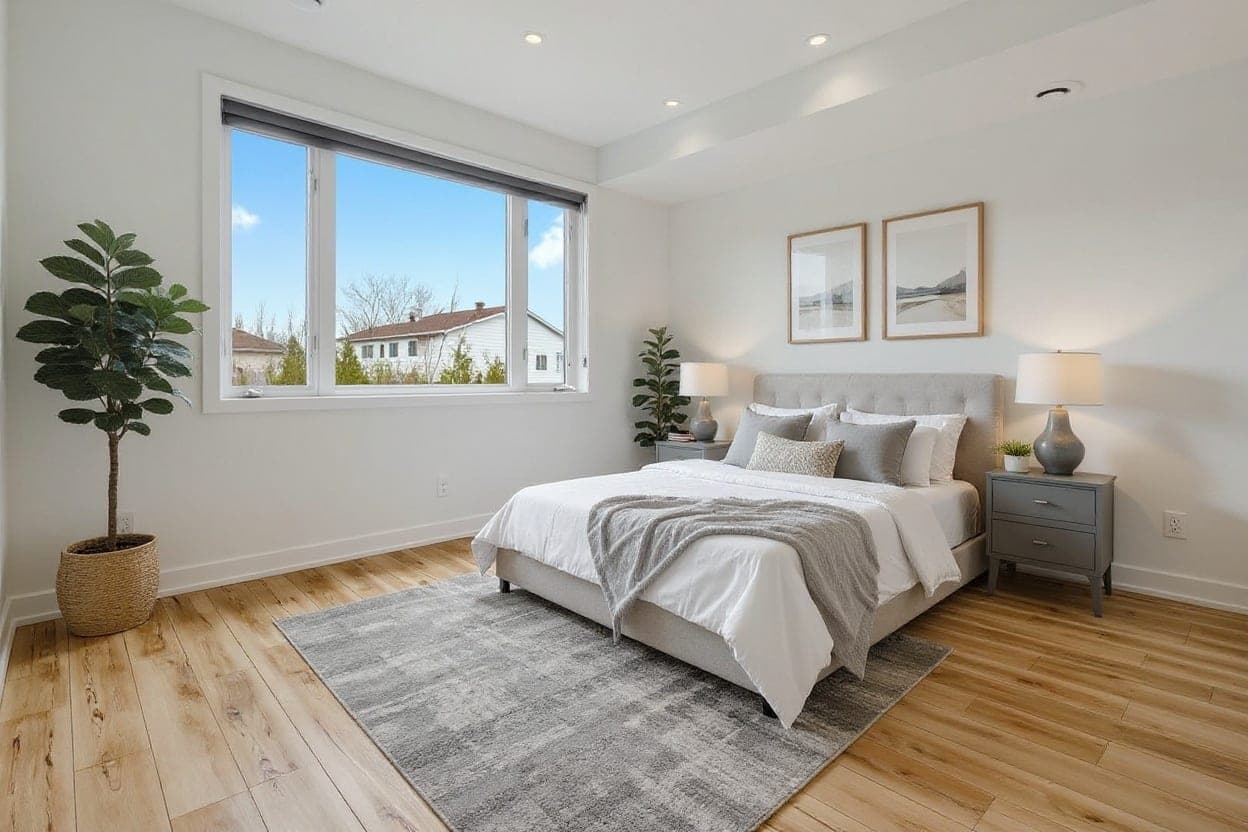
Empty bedroom, staged — structure verified against the original · drag to compare
What makes Stagefront different
- Masked staging. For empty rooms, the architecture is protected by construction, not by prompt politeness — the AI literally cannot repaint your walls or move a window.
- Structure verification on every image. Not a sampled QA, not a marketing claim — an automatic check per generation, with a free regeneration when it fails.
- Compliance labels in the bytes. Virtually staged or Digitally enhanced is baked into the image itself. California AB 723 asks for exactly this; we did it before it was fashionable.
- Originals always kept.The unedited photo is stored side by side with every result — the “access to the original” half of disclosure rules, satisfied by default.
- Honest pricing. $2.49 an image, no subscription required. Plans from $29 a month if you list regularly — monthly or yearly (2 months free), with credits that roll over while subscribed; failed generations are refunded automatically.
What it costs
3 free watermarked images to start. Then $2.49 per image pay as you go, or plans for volume: Starter $29 / month for 40 images (≈ $0.73 each), Pro $49 / month for 100 ($0.49 each), Photographer $99 / month for 300 (≈ $0.33 each) — monthly or yearly, yearly 2 months free. Unused plan credits roll over while you’re subscribed. Overage $1.49 per image; top-ups 10 for $24.90 or 25 for $59.75 (never expire); cancel anytime. How that compares.
How does AI virtual staging work?
Four steps. You upload a photo. The system recognizes what it is looking at — room type, or a building exterior. It generates the staged or enhanced version inside strict constraints. Then it checks the result against your original, labels it, and stores both side by side. The whole run usually takes 1-5 minutes.
Why do AI-staged photos sometimes change the room?
Because most tools re-render the entire photo and simply ask the model, nicely, not to touch anything. Image models drift: windows get resized, walls repainted, fixtures invented. Stagefront prevents it two ways — for empty rooms the photo is masked so the AI can only work where furniture goes, and every generation is verified against your original afterwards. A failed check regenerates automatically, free.
What does the structure check actually verify?
Window and door count, window pane grids, and wall color — compared against your original photo on every single generation. On masked stagings, the walls, windows and built-ins are not merely checked; those pixels come from your original by construction. You still review every result before publishing — verification is a filter, not a substitute for your eyes.
Do I need a subscription?
No. Pay as you go is $2.49 per image, and any purchase lifts the watermark and unlocks the clean HD file. Plans exist for volume — Starter $29 for 40 images, Pro $49 for 100, Photographer $99 for 300 — monthly or yearly, with yearly 2 months free and never a lock-in. Top-up credits never expire, and unused plan credits roll over while you’re subscribed.
Are AI-staged photos labeled?
Always. Every export carries a visible Virtually staged or Digitally enhanced label baked into the file — it cannot be forgotten or left in another tool. Your original is kept alongside every result and downloadable anytime, and each image gets a shareable proof page showing the before, the after, the label and the timestamp.
Judge it on your own photos.
3 free watermarked images, no card required — staged in 1-5 minutes, labeled and original kept.
Related
Virtual staging software · Day-to-dusk twilight photos · Declutter listing photos · AI & listing disclosure